
Agents Page
Manage all your AI agents from one place - create, edit, and monitor agent performance
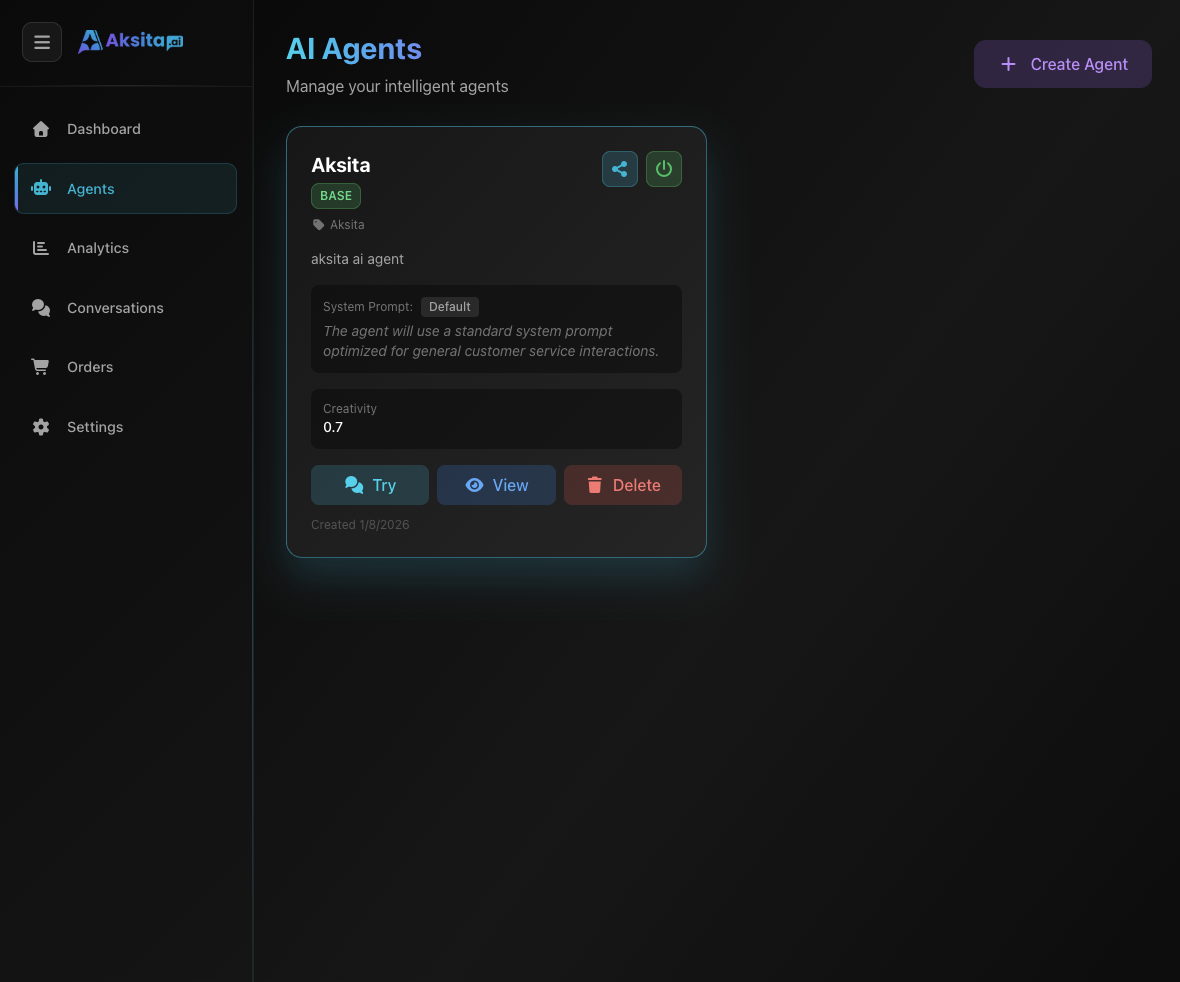
Screenshot: Dashboard Agents
Screenshot: Dashboard Agents
About Agents Page
The Agents page is the control center for all AI agents you create. Here you can view your agent list, create new agents, and manage each agent's configuration.
Key Features:
- Agent List: View all agents with status, tier, and performance info
- Create New Agent: Quick button to create agent with wizard
- Agent Cards: Quick preview with name, description, and statistics
- Status Toggle: Enable/disable agents with one click
- Quick Actions: Share, view, delete directly from card
Agent Card Components
Each agent is displayed in a card containing important information:
Card Header
- • Status Toggle: Switch for active/inactive (top left corner)
- • Share Button: Button to share agent (top right corner)
- • Brand Logo: Logo or agent initial
Agent Information
- • Agent Name: Main title
- • Description: Brief explanation of agent function
- • Tier Badge: Base, Plus, or Premium
Actions
- • View: Open agent overview page
- • Delete: Delete agent (with confirmation)
Creating New Agent
Click the "+ Create New Agent" button to open the agent creation wizard.
Creation Steps:
- Basic Information: Name, description, and brand
- Select Tier: Choose Base, Plus, or Premium
- Configure Behavior: Set tone, temperature, and character
- Set Access: Public (free) or Private (paid)
- Add Starter Prompts: Quick questions for users
Tips: Learn more details in the Create Agent tutorial.
Managing Agents
Viewing Agent Details
Click the "View" button to open the agent overview page containing:
- • Agent status (active/inactive)
- • Tier and model used
- • Configured starter prompts
- • Navigation to Resources, Clients, API Keys, Embed, and Settings tabs
Enabling/Disabling
Use the toggle switch in the top left corner of the card to:
- • Active: Agent can be used and receive requests
- • Inactive: Agent is temporarily unavailable
Sharing Agent
Click the "Share" button to get a link to share your agent with others.
Deleting Agent
Click the "Delete" button to permanently delete the agent.
Warning: Agent deletion is permanent and cannot be undone. All data, resources, and conversations will be deleted.
Plan Limits
The number of agents you can create depends on your subscription plan:
Free
1 AgentPerfect for trying out and exploring
Starter
3 AgentsFor small businesses and freelancers
Professional
5 AgentsFor teams and agencies
Business
10 AgentsFor medium-sized companies
Need more agents? Upgrade your plan on the Orders page.
Tips & Best Practices
Organization
Name agents clearly according to their function. Example: "Customer Support Bot", "Sales Assistant", "FAQ Helper".
Testing
Always test agents before publishing. Use the "Try Chat" feature to ensure responses meet expectations.
Monitoring
Monitor agent performance regularly on the Analytics page to understand usage patterns and improve quality.
Security
Use Private mode for agents containing sensitive information or for specific clients only.