
Invoice
Learn about invoice details, PDF download, and order status
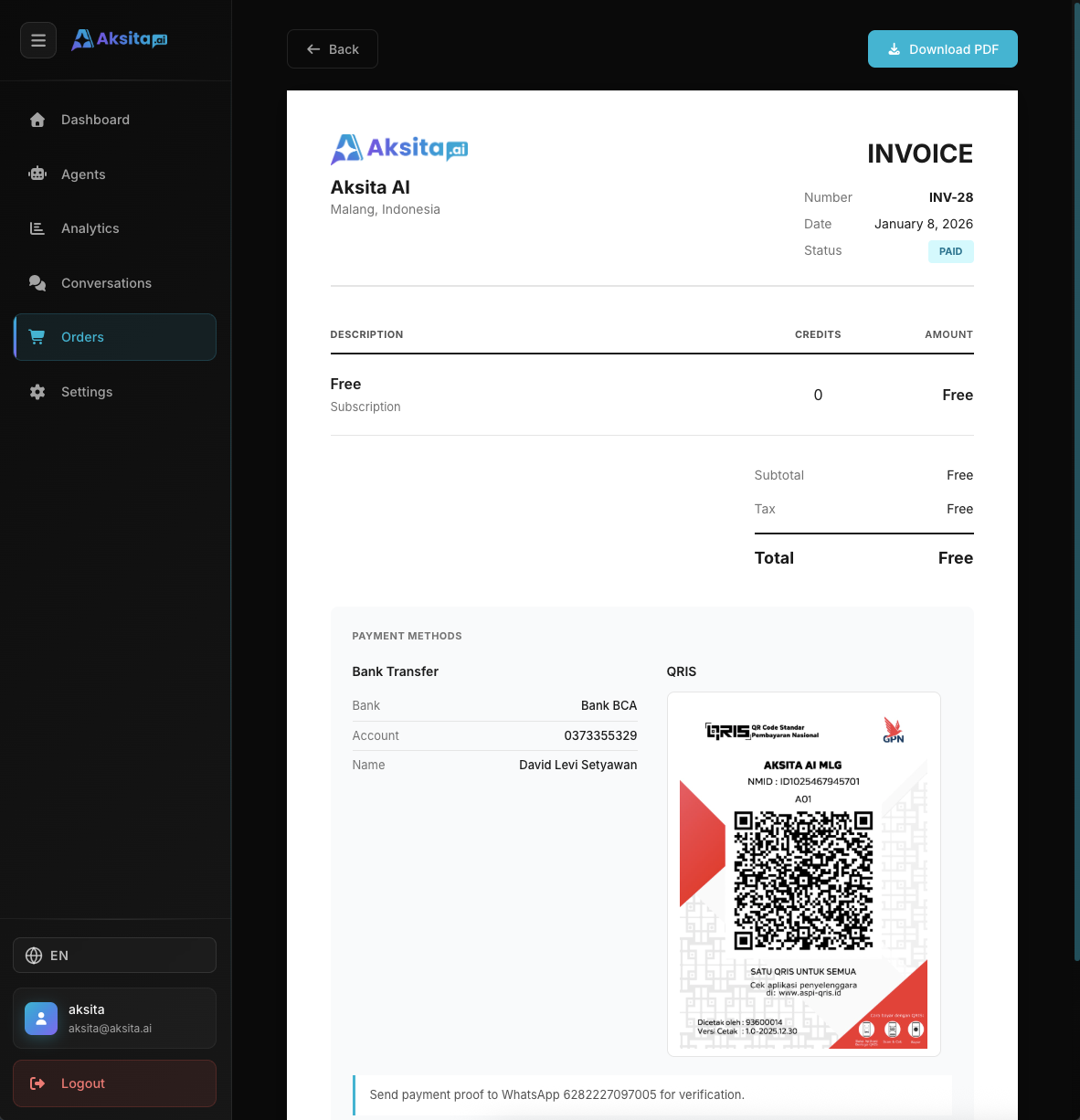
Screenshot: Invoice
Screenshot: Invoice
Invoice Page
The invoice page displays complete order details, including company information, payment details, and PDF download option:
Company Information
- • Company name: Aksita AI
- • Address: Malang, Indonesia
- • Website: aksita.ai
- • Phone: 6282227097005
Invoice Details
- • Invoice Number: Format INV-{orderId}
- • Date: Order purchase date
- • Status: Order status with colored badge
- • Rejection Reason: Displayed if status is Rejected
Line Items
Table displaying:
- • Description: Item name, type (Subscription/Add-on), and action badge (Upgrade/Extend/New)
- • Credits: Number of credits received
- • Amount: Total price (Rp format)
Payment Information
- • Bank Name: Bank BCA
- • Account Number: 0373355329
- • Account Name: David Levi Setyawan
- • QRIS: QRIS code for quick payment
Download Invoice PDF
Invoice can be downloaded in PDF format for accounting or record keeping purposes:
PDF Invoice Features:
- • Format: PDF with custom size (1080px width)
- • Content: All information from invoice page including company info, order details, payment info
- • Logo: Aksita AI logo in header
- • Status Badge: Order status with color-coded badge (cyan for Paid, red for Rejected, orange for Pending)
- • Payment Details: Bank transfer information and QRIS code
PDF invoice is generated client-side using jsPDF library. PDF file is ready for printing or saving.
Order Status
Pending
Order is awaiting payment. User needs to make transfer according to payment details shown in invoice.
Paid
Payment has been received and order successfully processed. Credits or subscription is now active.
Failed / Rejected
Order failed or rejected. For Rejected status, rejection reason is displayed below status badge.
Expired
Order has expired due to no payment within the specified time.
Previous
Credits
Credit system